Showing posts with label cables. Show all posts

Monday, November 7, 2011

Does the Quality of HDMI Cables Matter?

Does the Quality of HDMI Cables Matter?

Hdmi

HDMI cables have created quite a stir in the AV world. It's a new digital format which has incredible capabilities both in the speed in which it can transmit data and the way it transmits data. Gone are the days when you need to ask your technical guru about which cables to use. With HDMI, it's one cable and you're ready to go for just about anything.

However, debate has also sprung up amongst enthusiasts and purists with regards to whether or not high end HDMI cables make a difference. The argument is simple: if HDMI is digital, what advantages would higher quality HDMI cables bring? Additionally, is there any point at all spending money on anything other than the cheapest and most basic cable?

Unfortunately there is no simple answer to this question. Firstly, not all HDMI cables may be compatible or capable for the application. HDMI has only been around a relatively short time, yet at the time of writing we've already had 3 major updates post the initial release: V1.1-1.3. The latest standard alone, V1.3, has already had 3 versions: V1.3 a, b and c. Inevitably, the latest version will cost more than the earlier versions by the very fact that it's newer and up to date. While the version differences in the latter releases may be minimal, it is worth checking if the appliance requires a particular standard. Using a version lower than that required may be detrimental to quality or functionality.

Another consideration is the quality and design of the cable itself. The HDMI signal is in fact, extremely demanding on the cable. With any cable, the longer the run, the better the cable needs to be. In other words, the longer the cable, the more interference and noise is induced into the cable. Cables are manufactured and tested only on the length they are designed. If a short run of cable were to be extended, there is no guarantee that the cable would keep its performance, or in extreme cases, if it would work at all. This means that if a poorly controlled manufacturing/testing process were to be used to produce the cable (e.g. from a low quality brand), then the quality of a cable would certainly make a difference.

The last point to consider is HDMI's built in ability for error correction. It is true that there is some capability for error correction in HDMI's design. However, this does not apply to video or audio. When used with a compatible appliance, the error correction will simply attempt to guess what the signal could have been. This means that errors will still occur if not transmitted correctly. While the probability of errors is certainly reduced with superior design of the HDMI signal, it is by no means error free. A better quality cable would therefore reduce the chance of this occurring.

In an ideal world, there would be no difference between a quality HDMI cable and an ordinary one. Unfortunately in the real world this is not the case. There are always bad products, good products and better products. The good news is that the difference between the performance of these products is becoming more and more marginal. If you are looking to buy a cable to connect your flat-screen TV, it's certainly worth getting a quality cable. However, there is also no longer any need to go overboard.

summer clearance men watches

Thursday, October 20, 2011

Cables to Go 40970 Velocity HDMI Coupler


Cables to Go 40970 Velocity HDMI Coupler


Rate This Product :


Cables to Go 40970 Velocity HDMI Coupler

Cables to Go 40970 Velocity HDMI Coupler
Extend an overall length by coupling two HDMI cables

Cables to Go 40970 Velocity HDMI Coupler

  • It can often be difficult to predict where components will need to be placed in the future, or to calculate the needed cable length for an installation. Miscalculations often aren't noticed until the cable is already installed

Cables to Go 40970 Velocity HDMI Coupler

Available at Amazon : Check Price Now!


Cables to Go 40970 Velocity HDMI Coupler
*** Product Information and Prices Stored: Oct 20, 2011 14:21:17 ***

isolation headphones

Tuesday, October 11, 2011

Types of HDMI Cables

Types of HDMI Cables

Hdmi

If you are planning to buy hdmi cord then it is about time that you should consider delving deeper into this technology. High-definition Multimedia Interface is a brand new technology that has revolutionized the entertainment industry. You need to be aware of this technology before going for any purchase. The good thing is that you can easily find that information on the internet with complete details about the technology.

There are four main types of cables that can carry this technology. All of these cables are used in entertainment consoles, Blu-ray disc players and other devices that use digital signals. You can buy any type of hdmi cord but you should first assess your real needs as any wrong purchase can cost you money and will also waste your time as you will have to go for a replacement or refund.

The first type is known as Type A and is the most popular and most common in use. This type of cord uses a standard of 19 pins and is available in the standard format and plug size. This type of cable is most widely used and is perfect for all types of electronic equipment and entertainment consoles.

The second type of cable is known as Type B and is mostly used in the film and TV industry. This type of cord uses 29 pins instead of 19 and has a smaller plug size. It is perfect for use in entertainment industry where different type of equipment and devices are used and directors and technical staff want more flexibility.

The third type of cable is known as Type C and uses HDMI 1.3 specification. They also use 19 pins but have smaller plug size. It can be used with portable devices and does not hold much water for use with standard entertainment consoles.

Fourth type, also known as Type D, also uses 19 pins standard and has smaller plug size. It can however be used with standard electronic equipment and works well with all types of entertainment consoles.

All four types of cords are suitable for different types of consoles and cannot be used interchangeably. Type A is the most common type and is regularly used in homes and the corporate sector. Film companies and television units are more comfortable with Type B whereas Type C and Type D can be used at home but with portable devices; Type D can also be used for standard devices.

baby seat for car

Sunday, October 9, 2011

Super Speed S3 HDMI Cables

Super Speed S3 HDMI Cables

Hdmi

If you're in the market for a HDMI cable, you can easily get lost in the diversity of species and even more confused by the recommendations of the seller. There are some types of HDMI port, which are suitable for different applications, but all you need is an HDMI cable that works. It 'a bit' of difference between the most expensive and the cheapest ones, because the former are often thicker and more misuse and abuse could resist, but it is unlikely thatneed a super-tough HDMI lead on a first place. As long as you pick the correct model and length that works for you, you will not need to worry about its model, characteristics, or standards that the cable uses.

One of the excellent HDMI cables, which comes highly recommended is the Super Speed S3 HDMI lead - it is one, which could be used with XBOX 360, Digital Receivers, LCD TV's, Blu-ray Players, PS3, TV screens, computers, and laptops. It is a cable, which is as universal as they come, supports all features, including the 1.2, 1.3, and 1.4 HDMI standard-using applications. Typically, the Super Speed S3 HDMI leads come with 24-karat gold plated connectors and a lifetime guarantee, which is likely to give any consumer the peace of mind that they deserve. You can find these types of HDMI cables in most of the large electronic stores or you can purchase them online from one of the specialized sites. Shopping on the Internet comes with many advantages as it allows you to place your order in a matter of minutes, have the cable delivered right at your doorstep, and you are likely to get a good price as well.

Amongst the main characteristics, which make the Super Speed S3 HDMI cables so popular are their support for all HDMI 1.3a,b,c features, HDMI 1.4 3D features, high speed Ethernet, 15.3 GBPS Bandwidth, up to 2160p resolution, audio return channel, triple Mylar shielding, 3D Over HDMI, Full Deep color, and Dual Stream 1080P. The cables are also suitable for in-wall use, which definitely adds to their flexibility. If you are on the market for a new HDMI cable, regardless of its intentional use, then make sure to ask the sales clerk about the Super Speed S3 HDMI cables and their advantages, or simply get online, and order one from the comfort of your home.

recliner lift chair photo tripod legs Tripod Legs

Wednesday, October 5, 2011

HDMI to Micro HDMI Cable, High Speed with Ethernet, 6 ft. HDMI High Speed Cables, HDMI High Speed Cables


HDMI to Micro HDMI Cable, High Speed with Ethernet, 6 ft. HDMI High Speed Cables, HDMI High Speed Cables


Rate This Product :


HDMI to Micro HDMI Cable, High Speed with Ethernet, 6 ft. HDMI High Speed Cables, HDMI High Speed Cables

HDMI to Micro HDMI Cable, High Speed with Ethernet, 6 ft. HDMI High Speed Cables, HDMI High Speed Cables

HDMI to Micro HDMI Cable, High Speed with Ethernet, 6 ft. HDMI High Speed Cables, HDMI High Speed Cables

  • Watch video, stream media, and view documents through your TV!
  • A must have accessory for those who would like to watch videos and work on the big screen.
  • The cable gets the video signal out through HDMI standard output.
  • Gold plated pins and grounds connections.
  • Note: Your TV must have HDMI for this cable to be compatible.

HDMI to Micro HDMI Cable, High Speed with Ethernet, 6 ft. HDMI High Speed Cables, HDMI High Speed Cables

Available at Amazon : Check Price Now!


*** Product Information and Prices Stored: Oct 05, 2011 21:40:47 ***

cheap kitchenaid blender Lounge Swing snap together ceramic tile

Friday, September 30, 2011

Cables To Go 54181 DisplayPort 1.1 Male to HDMI Male Cable, Black (6.5 Feet/2 Meter)


Cables To Go 54181 DisplayPort 1.1 Male to HDMI Male Cable, Black (6.5 Feet/2 Meter)


Rate This Product :


Cables To Go 54181 DisplayPort 1.1 Male to HDMI Male Cable, Black (6.5 Feet/2 Meter)

Cables To Go 54181 DisplayPort 1.1 Male to HDMI Male Cable, Black (6.5 Feet/2 Meter)
Use this DisplayPort to HDMI cable to connect a DisplayPort source directly to an HDMI display. The passive design will support a 1920 x 1080 resolution up to 3 meters. It is VESA compliant with transparent operation which will auto calibrate and configure the signal for minimal configuration. This is great for applicaitons when you want to connect a newer laptop or desktop to an HDMI enabled display. Connector 1: DisplayPort Male Connector 2: HDMI Male ** Note: These cables can only go from a DisplayPort source to a video source. It cannot go from VGA/HDMI/DVI to DisplayPort. In order to accomplish this, you will need an adapter to actually convert the video signal. **

Cables To Go 54181 DisplayPort 1.1 Male to HDMI Male Cable, Black (6.5 Feet/2 Meter)

  • Connector 1: DisplayPort Male Connector 2: HDMI Male
  • Connect a DisplayPort source directly to an HDMI Display!
  • The passive design will support a 1920 x 1080 resolution up to 3 meters
  • Warranty: Lifetime

Cables To Go 54181 DisplayPort 1.1 Male to HDMI Male Cable, Black (6.5 Feet/2 Meter)

Available at Amazon : Check Price Now!


Cables To Go 54181 DisplayPort 1.1 Male to HDMI Male Cable, Black (6.5 Feet/2 Meter)
*** Product Information and Prices Stored: Sep 30, 2011 16:38:28 ***

sound isolating headphones crystal deodorant stone

Thursday, September 15, 2011

What is the difference between HDMI cables, component cables and RCA cables?

What is the difference between HDMI cables, component cables and RCA cables?

Hdmi

A look back at changes in technology over the past ten years is difficult to integrate some new technologies with old. Even if a new TV that does not mean that everything that has bought into it, as well as being updated. However, the wires that must go into your components such as HDMI cables, component cables and RCA cables some fixes and updates.

HDMI cables are an improvement of the quality of the transport of audio andvideos. HDMI cables transmit digital images and sound requires the speed of light, do not pass through the video or audio. Because of the way, HDMI cables to maintain the integrity of audio and video, are consistent for connecting DVD players, cable or satellite and music input via a single cable, which is also interchangeable with different types of converters and adapters used. HDMI cables are the best choice for the lead wire configuration to a minimum andthe best from it.

But keep in mind that all the HDMI cable does not mean it will be HD. Thus, the image and the sound of the BlueRay player is not just the same as your 1984 videos from him. The number of HDMI plug-in can be limited on the TV would mean that you can select the devices for the priority.

Component cables are essentially video cables, which are divided into three components. If you are lookingto life, that in 1984 the old movies, as this may be to help to revive these memories again, without having to block and long o. 'Component cable' The name is the fact that the signals are separated to avoid interference with the other derivatives. Most of the components are separated by a video cable and audio broadcasts. The video broadcasts are also other, sometimes separated into color broadcasting, S-Video, RGB and includeYPbPr.

Component cables can run anywhere from a half-foot to 50 feet in length. They are easy to connect, because most TVs have a color matching plug-in at various points on the TV. This means that if you need a rapid deployment of components plug-in cable (such as a camera) are easy to find and offer a quick way to what you want on the big screen.

The most popular type of component cables are RCA cables, which is always composed of a male nameFinish, color and a copper ring around the entrance, which offers flexibility and Stability. Unlike an HDMI cable is the standard for HDMI irrelevant to the quality that comes out. However, the quality of the cables is important. Consider the design of the line and how they are used. If you do not want on such thin RCA cables in the attic, which is upwards of 140 degrees in the summer months, you roll up to 10 meters behind your RCA cables to sendEntertainment center.

When building your home entertainment center, you should be the priority of your audio and video and TV functions, then measure the length, thickness and quality of the cable needs prioritized, and get the most out of your home entertainment center have, as you can imagine.

marvel dj headphones aluminum vs stainless steel pressure cooker Fillable Clear Glass Table Lamps

Wednesday, September 7, 2011

Cables Unlimited SWB-7852 2-Port HDMI Amplifier and Splitter with Power (Black)


Cables Unlimited SWB-7852 2-Port HDMI Amplifier and Splitter with Power (Black)


Rate This Product :


Cables Unlimited SWB-7852 2-Port HDMI Amplifier and Splitter with Power (Black)

Cables Unlimited SWB-7852 2-Port HDMI Amplifier and Splitter with Power (Black)
This 2-Port HDMI Amplifier & Splitter distributes the input of one HDMI source to two identical outputs at the same time. Each amplifier splitter's output can achieve a transmission of the HDMI signal to more than 15 meters. When two or more amplified splitters are cascaded, they can create even longer distribution lengths. Perfect for DVRs, BLU-RAY & DVD players, game consoles like Xbox & PS3 or any HDMI signal you want to broadcast over multiple monitors in your home, school or retail display environment.

Cables Unlimited SWB-7852 2-Port HDMI Amplifier and Splitter with Power (Black)

  • Installs in seconds, no setup
  • Built in cable to go from HDMI source
  • Long distances achieved by cascading Amplifier Splitters
  • Supports High Speed HDMI
  • Supports video resolutions up to 1080p

Cables Unlimited SWB-7852 2-Port HDMI Amplifier and Splitter with Power (Black)

Available at Amazon : Check Price Now!


Cables Unlimited SWB-7852 2-Port HDMI Amplifier and Splitter with Power (Black)
*** Product Information and Prices Stored: Sep 08, 2011 13:30:35 ***

pulled pork pressure cooker recipe clip on aerobars for road bikes

Wednesday, August 24, 2011

Cables To Go 40436 HDMI Mini to HDMI 1080p Version 1.3 High Speed Cable with Deep Color (1 Meter, Blue)


Cables To Go 40436 HDMI Mini to HDMI 1080p Version 1.3 High Speed Cable with Deep Color (1 Meter, Blue)


Rate This Product :


Cables To Go 40436 HDMI Mini to HDMI 1080p Version 1.3 High Speed Cable with Deep Color (1 Meter, Blue)

Cables To Go 40436 HDMI Mini to HDMI 1080p Version 1.3 High Speed Cable with Deep Color (1 Meter, Blue)
Some newer electronic devices including camcorders and digital cameras are equipped with new HDMI Mini connectors to carry high resolution content. Our high quality Velocity cable easily adapts a HDMI Mini connector to an HDMI connector ensuring a high-quality low-loss connection. Enjoy high-resolution digital video and digital audio directly from your camcorder or camera on your HDTV. These fully-functional, high-bandwidth cables are tested to perform at industry standards and backed by a lifetime warranty.

Cables To Go 40436 HDMI Mini to HDMI 1080p Version 1.3 High Speed Cable with Deep Color (1 Meter, Blue)

  • HDMI Mini male to HDMI male cable
  • HDMI (v1.3 with Deep Color, x.v Color)
  • Supports full 1080p resolution
  • High bandwidth (340MHz/10.2 Gbps) for high-speed data transfer

Cables To Go 40436 HDMI Mini to HDMI 1080p Version 1.3 High Speed Cable with Deep Color (1 Meter, Blue)

Available at Amazon : Check Price Now!


Cables To Go 40436 HDMI Mini to HDMI 1080p Version 1.3 High Speed Cable with Deep Color (1 Meter, Blue)
*** Product Information and Prices Stored: Aug 25, 2011 05:02:41 ***

Oriental Rugs Alexandria Va pork tenderloin pressure cooker

Friday, August 12, 2011

Cables To Go - 40280 - 2M Sonicwave HDMI Digital Video Cable


Cables To Go - 40280 - 2M Sonicwave HDMI Digital Video Cable


Rate This Product :


Cables To Go - 40280 - 2M Sonicwave HDMI Digital Video Cable

Cables To Go - 40280 - 2M Sonicwave HDMI Digital Video Cable
Cables To Go SonicWave HDMI Type A Cable 40280 A/V Device Cables

Cables To Go - 40280 - 2M Sonicwave HDMI Digital Video Cable

  • CL2 rated for in-wall applications
  • Passes 1080p
  • Silver-plated oxygen-free copper conductors
  • Three layer shielding: two 80%+ OFC copper braids and one 100% overlapped Mylar® foil
  • 24K gold-plated connectors

Cables To Go - 40280 - 2M Sonicwave HDMI Digital Video Cable

Available at Amazon : Check Price Now!


Cables To Go - 40280 - 2M Sonicwave HDMI Digital Video Cable
*** Product Information and Prices Stored: Aug 13, 2011 02:16:16 ***

krup ice cream maker

Sunday, August 7, 2011

HDMI cables - HDMI Cable PS3 Price

HDMI cables - HDMI Cable PS3 Price

Hdmi

I am often asked about the differences between PS3 HDMI cable and the standard price of brand HDMI cable. This is usually quickly followed by questions ... "Why is the product of more expensive brand is better?" - AND - "It will be a normal working OK on my PS3?"

Let's look first to the second question. It can be confusing for people to understand when a non-Sony cables work with the PlayStation 3. For older players, which probably derives from the console propertyConnections during the last play-station models are used and marketed for the younger players to trade, is perhaps as simple as not knowing that there are always alternatives. Because of technological advances with 1080i, 1080p, blu-ray, and HD are no longer made the introduction of industry-standard connections, all the previous rules.

To comply with industry standards for connections to high definition is the PS3 for their use "in" Connecting a Blu-ray, satellite or cableReceive HD-TV box or a high definition signal. This means that all cables are the PS3, not only the high-end version branded as the manufacturer of this you may think fit. Since most players in front of a length of wire around 3-6 feet, you never need to pay more than $ 15 and in many cases much less. You can find some of the best HDMI cable offers the following links on my site below.

If you are looking at prices up to HDMI cable, the PS3 version of make,, You'll know that the cost beyond the price of a standard HDMI cable. But because it is expensive, making it a better job than the cheaper version. The truth is. A high-definition cable, and offers all, digital audio and video price, it is to transmit a signal to 0 and 1. The type of cable is the same, and the signal can not be cleaned in any way, which means a cheap cable will be just as good as more expensive.

That is, there is aThe exception to this rule and kick with longer cables. Approved for some reason, the digital signal weakens or breaks at work with a cable length of a field. At the time of writing, you will not find a good faith HDMI cable, the industry standard, which is about 15 meters (50 feet) in length. So beware, they are about, but to my knowledge does not meet all the standards of proof required to obtain accreditation. Let me know if you know different.

I hope thatclarifies peoples concerns. Now you are aware that when you buy an HDMI cable "ps3" brand, and I was in a small way, as the price cheaper HDMI cable is still there, you have many years of playing in high definition, but one quarter of the cost.

cat tree modern electric outdoor bbq grill hard plastic swimming pool

Thursday, July 14, 2011

Difference in quality between generic and Monster HDMI cables HDMI cables

There is a difference in image quality between the expensive HDMI cables for $ 99.00 retail electronic and generic brand HDMI cables, which can buy almost stuck with the change between the sofa cushions? To find out, is all, what we have to see what a HDMI cable. HDMI is a digital signaling protocol used for both audio and video signals, ie between the HDMI source (cable, satellite box, Blu-ray, etc.) and broadcast television, there is only one digitalSignal.

Digital signals provide information about the tracks. This means that the TV is only a matter of when it receives a response signal: It 'a 1 or 0? It 'really is that simple! With digital cable, whether or not the signal. There is no "in between" - without signal degradation that can occur with analog signals. If there is an electromagnetic interference or radio interference, it is highly unlikely that the TV for a 0, 1 or 0-1 for an error. If youconcerned about EMI and RFI interference, you can use a low-AWG cable. The lower the AWG number, the thickness of the cable. AWG cables are ideal for low wall installations and long cables.

Hdmi

Trademark or not, there are HDMI cable gives you the same results. As long as the cable meets the HDMI, it is good to go. From now on, to go with the cheaper generic brand cable to prevent burning along in your wallet!

Difference in quality between generic and Monster HDMI cables HDMI cables

lightbox cube light septic sprinkler heads ceramic tile looks like wood

Monday, July 4, 2011

HDMI Cable Component - Consider this before buying HDMI cables

If you buy in the market for HDMI cable, the selection is overwhelming. One problem I noticed is the use of the term component cable to HDMI. I am unaware of what people actually search for this term.

Let me try to explain. The component cable is an update of the old composite cables, gave you a cable for video and two channels, left and right for the sound. Composite cable has not been able to support digital signal processing. The component cable it came withthree cables, but in this case were for the three color channels (red, green and blue), supported by TV at that time. They have the image quality, but only if it had been inserted correctly. This cable is only support for analog signals and thus is not compatible with HDMI, as well as signals to and from the high-definition digital equipment.

Hdmi

So, for the last cable, designed to provide digital signals to provide the most transfer date home entertainment devicessuch as HDTV, Blu-ray, 1080p and 1080i cable and satellite, and the latest 3D-TV. Where are the best of the previous generation of cables used 3 cables, HDMI cables use a total of 19 all well wrapped in a shroud. The result is a cable diameter is about as healthy as a USB cable, making it ideal for installation in audio / video system.

Between 0 and 1, is offered without abandoning completely, they become poor image of the highest quality currently possible. Well, if yourTV, DVD player, etc. is not HD ready then buy these cables is a total waste of money and to be honest, probably would not have HDMI ports anyway.

My point here is that there is a big difference between the two, and there is no such thing as HDMI component cables. Before you buy HDMI cables to be sure that your TV is HDMI and if it would be a fool not to use them.

HDMI Cable Component - Consider this before buying HDMI cables

panamax in wall surge protector

Thursday, June 30, 2011

What is the difference between component cables and HDMI?

On a short length, not the cable makes no difference. What is different is that in the case of component cables to convert the TV signal to analog component to digital. In the case of HDMI cable, the signal is already digital. So it could be a big difference if your TV does not convert well.

Image quality aside, the reason why we recommend using the HDMI cable carries the signals is that HDCP is not component. If the source device, such as aCable box, looking for the HDCP handshake, and do not get it, it will output an HD signal. So if you want to watch HBO in HD from a cable box, you must use HDMI or DVI.

Hdmi

I use component cables. Then again, I was above $ 60 on it (gold plated, great conductors, often shielding, etc.) for both component video and audio channels. And, I bought a few years earlier were still in the HDMI cable. The difference in performance between the top-end component video cableand an HDMI cable is negligent. But if only standard RCA cables - as the company offers cheap cable TV for you - are not as good as the HDMI cable.

How the HDMI cable connections spread more and more, we are often asked: What is better HDMI or component video? The answer, as it happens, it will not cut and dried.

First, a note: everything is said here, as it appears for DVI-HDMI, DVI for consumer electronics devices less and less of alltime, not so often asked, but DVI and HDMI are essentially the same story, the image quality-wise. The main differences are that HDMI carries audio and video, and uses a different type of connector, but both have the same encoding scheme, which is why a source to a DVI to HDMI monitor, or can be connected and vice versa, with a cable DVI / HDMI cable, with no intervening converter.

The conclusion of this article - if you are not inclined to read all the details - iswhich is very difficult to predict whether an HDMI connection is better or worse image of an analog component video to connect. It will often be significant differences between digital and analog signals, but the differences are not part of the connection type and instead depend on the characteristics of the source (eg DVD player) and the display device (such as the TV). Why this is so, however, takes the discussion a little 'more.

Several peopleDay looking for a solution trying to HDMI interconnect to the outputs of the component via a connection cable for their high-definition equipment. Unfortunately, this is not a matter of reorganizing the right kind of cables and plugs. It 'a problem of incompatibility of basic analog and digital transmission similar to the upcoming digital TV to receive over the passage of rabbit ears for your current analog broadcasting signals. They are not compatible and can only confuse peoplelike the poor guy in the commercial register.

Component video is analog format. With analog signals, the signal voltage on the cable in wave format and how changes in wave height, what is important. Theoretically, there is an infinite number of values ​​between zero and maximum, variable wipers I had something like on an old Thunderbird. With HDMI or DVI format, these are based on digital signaling. Digitally as you have probably heard, uses ones and zeroswith a series of pulses all at the same height, and are present or absent. At the other end of the new set of information processing systems. Mounted on a 4-bit binary encoding can be one of 16 different values ​​of 4 1 and 0 as the group can have 16 different combinations. Equipment only at the end of the cable, the signal acquisition and is looking for analog waveforms would put out a total nonsense when he received pulses of 1 and 0

Some solutions are verysimple. When an HDMI or DVI on both boxes, use them. The difference between DVI and HDMI is that HDMI caries in addition to audio and video signals. But DVI is just as good and other than the cost of an additional audio cable, that will solve the problem. If you try to use the component outputs, because it is already linked to the HDMI connection, HDMI switch box that they are fairly cheap, where there are multiple HDMI cables on one side with a pin can outputother.

Components via a power analog signal is transmitted. HDMI is digital. Among other things, this has the following advantages: As long as the data is successfully transferred the perfect image of the incoming data into your TV. It is not a single pixel in the difference that erases the device 'submit' and what the TV will be reached. Component signals (such as all analog signals) may be of varying quality, and you can get interference.

So basically: At first glance, might seem the HDMI cablemore expensive than component cables, but it is not right. For the quality of the HDMI cable is requiered to the length you need together. If you have only a short distance (two or three meters) to cover a cheap cable offers the best possible result that can be achieved by any means ... is digital ... the cheap cable does not affect the image quality ... exactly as you use the Ethernet cable from your computer to connect to inet has no influence on image qualityVideo download / stream.

Of course this does not mean the component is bad: Under favorable connections analog video is probably by far the best, but only HDMI has the advantage of not having to worry about the signal accidentally "touched" by external influences during the transfer. So if you can: HDMI is the best choice.

What is the difference between component cables and HDMI?

barbecue grill pans school messenger bag best carryon luggage

Thursday, June 23, 2011

HDMI cables - what should I buy?

HDMI or High Definition Multimedia Interface is the main component cable for connecting HD devices. An HDMI cable can all formats of digital video and audio. Seemed to HDMI, you need separate cables for audio and video. You can also share content from an Internet connection. It can do this super-cable, not to mention cleaning up the wires behind the TV, it is. Do not you have dozens of cable confusion in all directions, an HDMI cable is all that. Need

For the best high-definition images, you must do all your home entertainment equipment - TV, Blu-ray players, game consoles, set-top box connected via an HDMI cable. Of course, all these devices are HD-capable. HD component cables to produce images (limited to 1080i), but you will still need the cable for audio output. And due to AACS restrictions have made all Blu-ray in 2010, only component video output with the 408th-Connections. HDMI is the best option.

Hdmi

Once the devices are connected via HDMI, have the ability to communicate with each other and discover each others capabilities. For example, if a Blu-ray player is connected to an HDTV, there is a process that automatically configure the settings like video resolution and aspect ratio of the content, he played up to match the capabilities of your HDTV.

Features Non-version numbers

Since its introduction in 2002, HDMISpecifications continued development. With each new version, a number of new features have been added. Version 1.3 was introduced in 2006 and 1.4 in 2009 launched.

The new versions were able to integrate the manufacturer of the new features in their devices. However, just because a TV or Blu-ray player is 1.4 and does not mean you can run all the cable features 1.4. For example, a Blu-ray player via HDMI Ethernet channel and thus the player can advertise 1.4 degree. SomeConsumer plays the Blu-ray then 3D is 3D, a feature associated with the 1.4 version of HDMI. But it would be unfair. With version numbers for HDMI cables can cause confusion and mislead the consumer.

For this reason, the version numbers are finally abolished when it comes to HDMI cables. Producers can still take to January 1, 2012 will be used, but must also reflect the particularities of their devices. All data are compatible withDevices. This is good news because they do not have to worry about new cable to work with older components.

What cable should I?

There are several companies marketing an HDMI cable. Some are good, some may be a little 'shady. Some will not even mislead the consumer, what is the cable into the situation and has the advantage of cable over the competition. This can cause consumers to several hundred dollars more to spend than necessary. The consumer mustexpensive HDMI cable offer any benefits gained in terms of image quality over HDMI cables in smaller or less.

There are four types of HDMI cables. Standard speed (also known as category 1), with or without Ethernet and high-speed (also known as category 2), with or without Ethernet cables. The cable standard speeds of up to 1080i resolution video and high-speed cable well beyond 1080p resolution. Standard cable is likely to 1080p content, but are nottold to do so. However, if you're buying the "right kind of cable," because there is not much difference in price when it comes to standard and high-speed connections, so the purchase should be the second, no problem.

With the "right kind of cable," mean "as cheap as possible." No matter what you say, when it comes to image quality, there is no distinction between expansive and inexpensive HDMI cable HDMI cable. The expensive cable may have a stronger and thicker, or castingbeefier connection. But you would think this is what you value. Most of us just need a cable to our Blu-ray player or cable box to connect to our TV. In these short distances a cheap HDMI cable will provide the best possible image and sound quality. Even over long distances, an inexpensive HDMI cable with the functionality in order.

So if you buy an HDMI cable, make sure you do not pay more than $ 5 U.S. dollars to two feet. Otherwise you pay too much. NotNot to be confused with the device features HDMI and HD-functions.

HDMI cables - what should I buy?

leather sofa restoration bbq grill cook essentials pressure cooker

Friday, June 10, 2011

What and how the HDMI cables are for.

What and how the HDMI cables are for. Video Clips. Duration : 2.65 Mins.


This video shows how to HDMI cable, what they want and use the prices of these lines. Any questions please contact me EverythingISTech@gmail.com.

Tags: HDMI, xbox360, cable, room, lamp301, everythingistech, tech, how, to, video

crawfish fishing lures

Thursday, June 2, 2011

You perceive the HDMI cables are designed to change gears?

You perceive the HDMI cables are designed to change gears? Tube. Duration : 3.83 Mins.


Many people out there who believe HDMI cable more or less the same. But they are wrong, wrong, wrong! Factors such as the refresh rate, color depth and resolution of all high-definition television concern, the amount of data that can transfer an HDMI cable. If the cable can not handle the load that can be forced to watch your video at a lower resolution. In this video, the first of a series, explains why it is necessary for our "brand value". These small logos appearOur HDMI cable packages and help people decide if the cables are adequate if you meet their needs.

Keywords: hdmi, monster, cable, speed, resolution, color, depth, bit, refresh, rate, hz, badges, consumer, electronics, high-definition, hi-def, high-def, HDTV, Blu-ray, bluray, BD

scepter gas can spout 8 qt pressure cookers

Tuesday, May 31, 2011

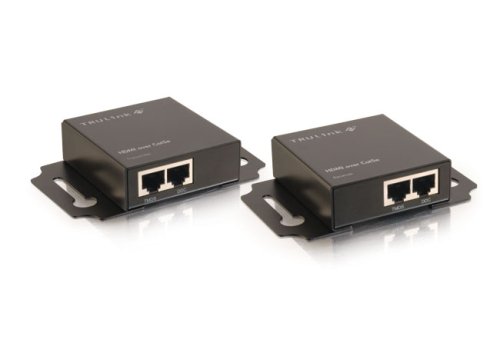
Cables To Go 40477 HDMI over Cat5E Extender

Cables To Go 40477 HDMI over Cat5E Extender Review


Cables To Go 40477 HDMI over Cat5E Extender Feature

  • Extend your digital video signal up to 60 meters (200 feet)
  • Cat5 UTP cabling enables easy and cost effective in-wall installation
  • Ideal for digital signage applications in retail stores, houses of worship, classrooms, and boardrooms
  • Supports the following resolutions using Cat5* cabling: 40m @ 1920x1080 (1080p 12bit) 60m @ 1920x1080 (1080i) 60m @ 1280x720 (720p)
  • Video Bandwidth: 2.25 Gbps (HDMI 1.3)

Cables To Go 40477 HDMI over Cat5E Extender Overview

The TruLink HDMI over Cat5e Extender is a robust solution that allows you to extend your HDMI signal up to 60 meters (200 feet) over two Cat5 Unshielded Twisted Pair (UTP) cables. This solution is ideal for applications where your HDMI monitor needs to be placed further than the average 10 meter HDMI cable limitation. Driving a HDMI signal over Cat5 allows you to take advantage of your UTP cable infrastructure already installed for a cost-effective and reliable installation.The TruLink HDMI over UTP solution is ideal for applications when you need to place your HDMI compatible screen in a remote location. This is common in large home installations or digital signage applications, in retail stores, houses of worship, classrooms, and boardrooms where you need video presentation in one room but want the source to be out of sight and in a safe and secure environment. With the TruLink HDMI over UTP Extender, you can place your display across the room, in another room, or on another floor while your source remains in a convenient location.

Available at Amazon


wall stickers decals

Tuesday, May 17, 2011

HDMI cables and wires

known HDMI cable or HDMI cable, and with their full name high-definition multimedia interface cable or cables are very popular and are increasingly in the various audiovisual products in homes. Since it is able, high-definition video and high-resolution audio is transmitted through a cable, it's really become a standard audio and video connections for devices such as high-definition television.
You can buy the HDMI-HDMI or a DVI-HDMI, depending on your needs.
These cablesare specifically designed for a very good connection, the signal strength and longevity, of course, lead to high-definition video and audio signals for various products such as home cinema or plasma, for example.
After the gold cord actually the quality of the cable or run it through the improvement of connectivity and power.

Hdmi

DVI-HDMI cables are typically developed at a computer DVI to connect to a TV or LCD as a high-definition plasma screen. You can alsobe gold to improve their performance.
Interestingly, DVI and HDMI are very similar, except that an HDMI cable, DVI video and audio, but you can not carry. But why use the same encoding scheme, DVI sources, in fact, it can also monitor HDMI, and vice versa connected. You need the right cable, a DVI-HDMI.
An HDMI cable is actually a cable that the best image quality and better sound quality delivered today. If the wiringFlat, house or business premises for high-speed Internet, or simply a professional look to a home cinema or plasma screen with HDMI cable, then you can consider, HDMI wall plates. And 'good because it simply eliminates the clutter of cables in the wall to hide it. More often, simply, USB cable, SCART or SCART connector is a device performs in your computer or laptop, or connect a device to the TV. platted SCART cable can also be gold to youwith better connectivity and a stronger signal.
There are so many cables around, now that it is sometimes hard to know what's going on, though, as different devices often need two or three different types of cables, lead without even counting the power. That is probably why more and more people to the wall plate as a first step to prevent the cable, try that anywhere in the room. HDMI cables and wires

art wall decals kitchenaid refrigerators water filter

Tuesday, May 10, 2011

They are expensive HDMI cables worth the price?

If you recently bought a new piece of home entertainment devices, then tried, without doubt, the seller is to sell an expensive HDMI cable to go ahead with our product. But why pay more for a "high quality" HDMI cable if you could do a bog standard cable for a fraction of the cost? This article is whether the more expensive HDMI cables actually see all the benefits, or is it just another way to get a little 'bit of extra money to be squeezedThem.

HDMI is a relatively new digital standard for quick connection to the all new AV. You no longer need a cable mess with HDMI, there is only a simple cable and run. So, since HDMI is a digital format, then certainly no advantage to buying a cheap cable, all cables to provide the same quality and the only thing you pay extra for a brand?

Hdmi

Unfortunately it is notsimple as not all HDMI cables are the same! Although the format is still relatively young, has already been some major updates since the first introduction - which only adds to the confusion - in fact, these revisions, a series of minor updates have it all. Of course, the cables meet the latest specifications and more expensive than the old cables that meet the specifications above so that it is not just about choosing a cable on price. You must alsoCheck that require specific equipment for optimal performance, as you point out, which may be a cable with a specific lower adversely affect the quality of audio and video clips. In some cases, the device may not be so sure, check the manual that you need version with HDMI function in older cable.

Something else must be borne in mind that HDMI is a high demand on the cable may be, can not cheaper cables deliver the same qualitymore expensive than cable. This is especially true for longer cable lengths: the longer the cable is easier for the signal is distorted. Therefore, if you need a long cable, make sure the cable was manufactured to a high standard with high quality components should be. The cheaper brands tend to have lower quality cables, use the most sensitive to interference, thus providing a lower quality signal.

Otherwise, given that the platform works during the HDMIhave some ability to correct error, which does not completely eliminate error. If a compatible device receives an error, try to estimate what would have been the signal should be, but if the signal is not transmitted properly first, then the error correction can do little. HDMI signals are certainly less prone to mistakes, but you can still pass, so that a higher quality cable would help ensure that the quotas have been reduced to it.

It would bebe great if all the HDMI cables that offer the same quality and performance, but unfortunately this is not the case. No matter what the market has always existed independent products that were made standard for an award of costs and products that were made to a lower standard, cheaper. The good news from a consumer perspective is that the difference in the performance of smaller and smaller all the time, so if youneed an HDMI cable I should ensure that you make an element of good quality, but it is not necessary to spend large sums of money.

They are expensive HDMI cables worth the price?

9030 water filter pressure cooker weights cooks essential electric pressure cooker